

glossary
SKAdNetwork (SKAN)
Apple’s privacy-first attribution framework for iOS app install ads. Measures campaign performance without exposing user-level data. Required for iOS UA post-ATT.
Quick Definition
SKAdNetwork (SKAN) is Apple’s privacy-first attribution framework for iOS app install ads. It measures campaign performance without exposing user-level data. Required for iOS UA post-ATT.
What is SKAdNetwork
SKAdNetwork is Apple’s way of letting you measure ad performance without breaking their privacy rules. When ATT killed user-level tracking in iOS 14.5, SKAN became the primary attribution method for iOS campaigns.
The basic trade: you get campaign performance data. You give up individual user tracking.
SKAN handles the majority of iOS attribution today. ATT opt-in rates typically run 15-30% (varies widely by app category and region), which means SKAN is doing the attribution work for roughly 70-85% of iOS installs, the users who didn’t opt in. Most of your iOS attribution runs through SKAN whether you like it or not.
Core concept: Aggregated signals replace individual user tracking. You get enough data to optimize campaigns. Apple protects user privacy. Everyone moves forward.
How It Works
The SKAN Flow
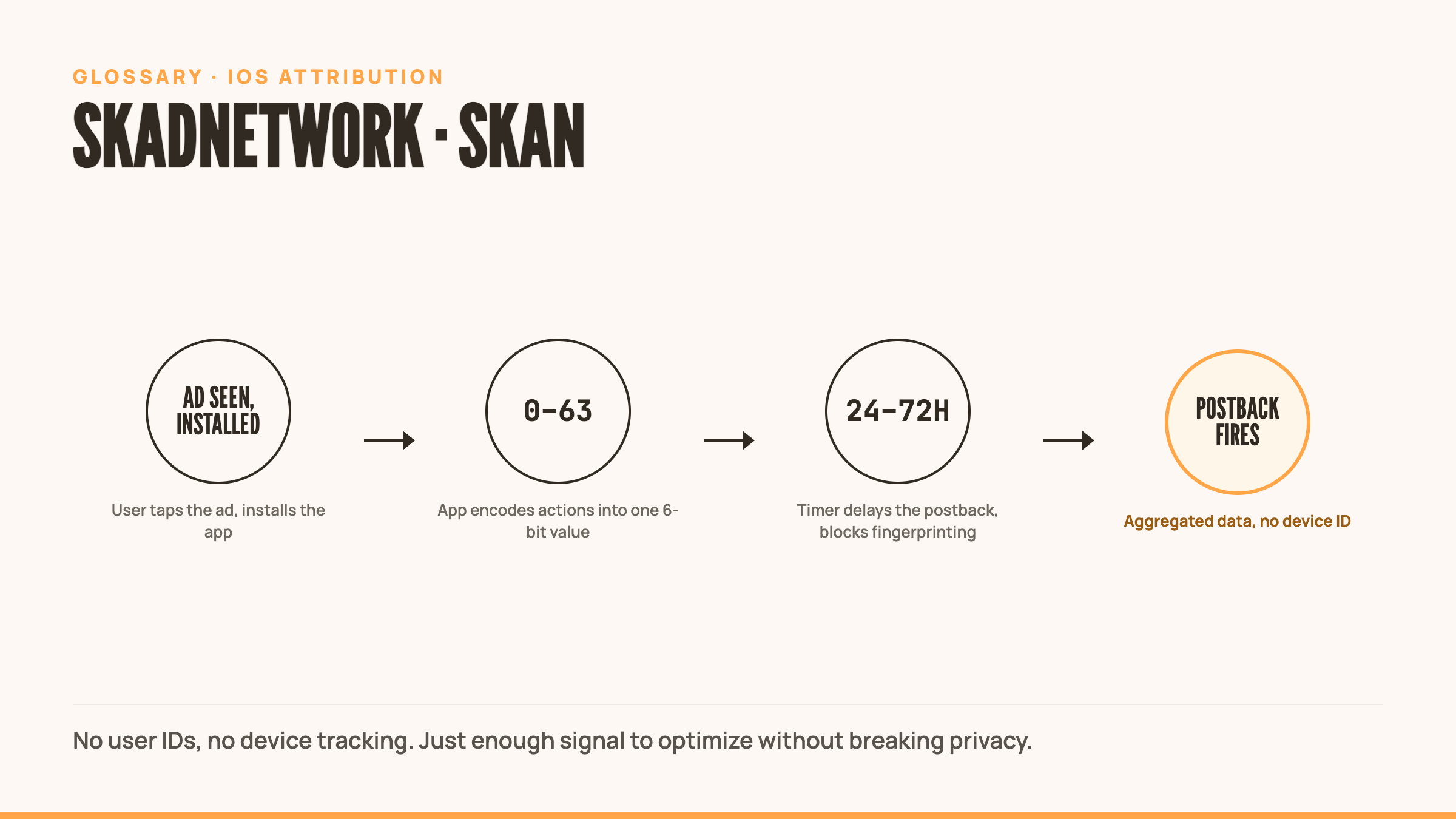
- User sees ad → Ad network registers the impression via SKAN
- User installs app → iOS assigns attribution to the winning ad network
- User takes actions → App tracks in-app events, converts to conversion value (0-63)
- Timer runs → SKAN waits 24-72 hours after install (prevents fingerprinting)
- Postback fires → Apple sends aggregated attribution data to ad network
What You Get in the Postback
SKAN 4.0 sends three postbacks:
- Source identifier – Which campaign drove the install (encoded)
- Conversion value – 6-bit value (0-63) representing user actions
- Coarse conversion value – Low/medium/high quality bucket
- Lock window – Whether timer ended early (indicates re-engagement)
What you don’t get:
- Device ID
- User-level data
- Precise attribution timing
- Deterministic user journey
Conversion Value Setup
You have 6 bits (64 possible values) to encode user behavior. Most teams map it like this:
- 0-10: Tutorial completion, early engagement
- 11-30: First purchase, revenue thresholds
- 31-50: Mid-tier spenders, retention signals
- 51-63: Whales, high LTV indicators
The mapping determines how you optimize. Choose wrong and you’re flying blind.
Version History
SKAN 1.0 (2018)
Launched with iOS 11.3. Basic install attribution. Almost nobody used it because user-level tracking still worked.
SKAN 2.0 (2020)
Added conversion values (6-bit encoding). Still mostly ignored.
SKAN 2.2 (2021)
Launched alongside ATT in iOS 14.5. Suddenly critical. Added view-through attribution, a did-win flag, campaign IDs up to 100. This is when everyone scrambled to implement SKAN properly.
SKAN 3.0 (2021)
Increased campaign IDs from 100 to 10,000. Let you split test more granularly without burning through IDs.
SKAN 4.0 (2022)
Current version. Added:
- Three postbacks (instead of one) – More conversion windows
- Coarse values – Low/medium/high buckets for smaller campaigns
- Web-to-app attribution – Track Safari ads to app installs
- Lock windows – Better re-engagement detection
SKAN 4.0 is what you’re running today if you’re on iOS 16.1+.
Future: AdAttributionKit (AAK)
Apple announced AdAttributionKit at WWDC 2024. It’s replacing SKAN starting iOS 17.4+.
What changes:
- More flexible conversion value schemas
- Better web-to-app attribution
- Enhanced privacy-preserving measurement
- Crowd anonymity instead of fixed timers
Timeline: Gradual rollout. SKAN 4.0 still works. AAK becomes default for new implementations.
What this means: Another migration. More documentation. Different postback formats. If you just finished optimizing your SKAN setup, welcome to doing it again.
Best Practices
1. Optimize Conversion Value Mapping
Your 64 values are scarce. Map them to what predicts LTV. Don’t waste values on vanity metrics.
Good mapping: Revenue thresholds, D1/D7 retention, first purchase timing Bad mapping: Tutorial steps, button clicks, cosmetic actions
2. Test at Scale
SKAN requires volume. Small tests get too much noise. Run bigger budgets or accept that you’re optimizing blind.
Minimum viable test: $10K+ spend per variation to see signal through the noise.
3. Use Hierarchical Campaign IDs
Structure your campaign IDs to preserve attribution granularity:
- Level 1: Ad network (2 digits)
- Level 2: Campaign type (2 digits)
- Level 3: Creative variant (2 digits)
Example: 010203 = Facebook (01), Prospecting (02), Creative Pack 3 (03)
4. Extend Measurement Windows
SKAN postbacks fire 24-72 hours post-install. Your measurement needs to go longer. Use probabilistic modeling or cohort analysis to project LTV beyond the postback window.
5. Combine SKAN + ATT Data
Users who opt into ATT give you deterministic tracking. SKAN gives you everyone else. Build dual attribution logic that leverages both.
Common Mistakes
Mistake 1: Optimizing to Installs Only
SKAN gives you conversion values. If you’re only looking at install volume, you’re leaving money on the table. Optimize to conversion value, not just CPI.
Mistake 2: Testing Too Granularly
You don’t have enough data to split test 50 creative variants with SKAN. The aggregation and delays make small tests useless. Batch your tests into bigger cohorts.
Mistake 3: Ignoring Null Postbacks
Some installs never send postbacks (fraud, bots, users who delete immediately). If 40% of your installs are null postbacks, your attribution is broken or you’re buying garbage traffic.
Mistake 4: Expecting User-Level Precision
SKAN is aggregated and delayed. You can’t retarget specific users. You can’t build precise LTV curves. Adjust your analytics and expectations accordingly.
Mistake 5: Not Updating for SKAN 4.0
Still running SKAN 2.2 logic? You’re missing three postbacks, coarse values, and better fraud detection. Update your implementation.
Related Terms
- ATT (App Tracking Transparency) – Apple’s opt-in framework that made SKAN critical
- User Acquisition (UA) – How you’re buying users on iOS
- CPI (Cost Per Install) – What you’re paying per install
- LTV (Lifetime Value) – What you’re trying to predict with conversion values
- ROAS (Return on Ad Spend) – What you’re optimizing toward
- Conversion Value – The 0-63 signal you send via SKAN
- Postback – The attribution data Apple sends to ad networks
- AdAttributionKit (AAK) – Apple’s next-gen replacement for SKAN
External Resources
- Adjust SKAN Glossary – Technical overview and implementation guide
- AppsFlyer SKAN Guide – Measurement best practices
- Apple SKAN Documentation – Official technical reference
- Apple AdAttributionKit Docs – Next-gen framework replacing SKAN
Frequently Asked Questions
What is SKAdNetwork?
Apple’s privacy-preserving attribution framework for iOS app install ads. It measures campaign performance in aggregate, without exposing individual user data, and became the primary attribution method for iOS after ATT cut off user-level tracking in iOS 14.5.
What is SKAdNetwork for iOS in practical terms?
It’s the only attribution mechanism that works when a user hasn’t granted App Tracking Transparency consent, which is the majority of iOS users today. SKAN sends aggregated conversion values back to ad networks 24-72 hours after install instead of tracking a device in real time.
Do I need SKAN if my users opt into ATT?
Yes. Only 15-30% of users typically opt in to ATT tracking. SKAN handles attribution for everyone else, meaning without it you’re blind to the majority of your iOS traffic.
Can I track individual users with SKAN?
No. SKAN is aggregated and anonymized by design. You get campaign-level performance data, not user-level journeys or device IDs.
How long does SKAN attribution take?
24-72 hours after install for the first postback. SKAN 4.0 sends three postbacks across longer windows, so expect real delays compared to Android or pre-ATT iOS attribution.
Last Updated: December 2025